

If you searched for playmyworld.com, you may simply be trying to figure out what this website actually is. The name sounds like a gaming platform, but the information published about it can make the picture a little confusing.
That confusion matters because some pages describe PlayMyWorld as a social gaming platform where people create and play online worlds, while the website itself currently presents a much wider mix of gaming, entertainment, lifestyle, and other content.
Are you trying to understand what playmyworld.com really offers? Maybe you also want to know whether the descriptions you found online match the actual website, whether you have reached the correct domain, and what you should consider before using it.
Let’s sort those questions out one by one. The goal here is not to repeat every claim you may find online. It is to separate what can be seen or verified from what still needs a closer look.
What Is PlayMyWorld.com Actually?
If the main problem is simply “What is this website?”, the first thing to do is look at the exact domain itself instead of relying only on descriptions from other pages.
PlayMyWorld.com is a live website that publishes content around gaming and entertainment. Its own About page describes Play My World as a destination covering gaming, movies, hobbies, social media, health, and other lifestyle interests. It also mentions gaming accessories and other products and resources.
That means it is not accurate to describe the current domain only as a single-purpose game or multiplayer service without adding some context.
What the Website Actually Publishes
The site’s content includes gaming-related material, such as gaming equipment, console topics, online gaming, and guides.
At the same time, its current content goes beyond gaming. The About page talks about movies, hobbies, social media, health, and lifestyle topics as well.
So, if you arrived expecting one specific game, app, or multiplayer service, that may explain some of the confusion.
The simplest description based on the website itself is:
PlayMyWorld.com is a broad content website with a strong gaming and entertainment focus, rather than something that should automatically be treated as one specific game or gaming app.
Why the Name Can Be Confusing
The name PlayMyWorld naturally sounds like a service where users can create a world, join other players, or play games together.
Some articles published on the domain make exactly those kinds of claims. One article describes PlayMyWorld as a social gaming platform for creating, sharing, and playing custom online worlds. Another describes browser-based multiplayer games, private lobbies, matchmaking, and other features.
But there is an important difference between an article describing a service and evidence that the current website actually provides every feature mentioned in that article.
You know, this is an easy place to get the wrong idea.
If your question is “What is playmyworld.com?”, start with what the domain currently presents about itself. Do not automatically turn every feature mentioned in a related article into a confirmed feature of the website.
That gives us a much clearer starting point.
Why Do Different Pages Describe PlayMyWorld Differently?
If you have already searched the name, you may have noticed something odd: different pages give very different explanations of PlayMyWorld.
One page calls it a social gaming platform for creating and sharing worlds. Another describes casual multiplayer games, rooms, tournaments, and social features. Yet the site’s About page presents a much broader entertainment and lifestyle website.
So the real problem is not just finding another description. It is figuring out which information should be treated as established and which information needs verification.
What the Website Says About Itself
The site’s own About page presents Play My World as a broad destination for entertainment and lifestyle information. It specifically mentions gaming, movies, hobbies, social media, health, and related products and resources.
That is useful because it comes directly from the domain being discussed.
The website also has a Privacy Policy that identifies https://playmyworld.com/ as the website covered by the policy.
Its Terms & Conditions page also identifies the website as https://playmyworld.com/.
These are direct pieces of evidence about the site itself.
What About the Gaming-Platform Claims?
There are several PlayMyWorld articles that describe features such as:
- custom game creation
- multiplayer worlds
- social tools
- matchmaking
- tournaments
- rewards
- account systems
- parental controls
- two-factor authentication
Those descriptions appear in articles published on the domain.
However, that does not automatically establish every listed feature as a current, independently verified service feature.
For example, one article claims that PlayMyWorld supports user-created games and virtual spaces, while another describes paid tournaments and cash prizes.
Those are claims found in the site’s published content. They should be treated differently from something you can directly establish from the site’s basic pages.
This distinction is important if you are deciding whether to create an account, pay money, download something, or give the site personal information.
The Simple Way to Understand the Difference
Think of the information in three groups:
Verified from the website:
The exact domain exists, it publishes content, and it has pages such as About, Privacy Policy, and Terms & Conditions.
Claims published about the platform:
Some PlayMyWorld articles describe gaming-platform functions such as multiplayer play, world creation, social features, and tournaments.
Needs verification:
A specific feature should not be treated as confirmed simply because another article mentions it. This is especially important for payments, prizes, account requirements, security tools, or anything that could affect your money or personal information.
Once you make that distinction, the conflicting descriptions become much easier to understand.
You do not have to choose one article and blindly believe it. You can check what the exact domain establishes for itself and treat the rest according to the evidence available.
That resolves the main confusion about why PlayMyWorld can appear to be several different things online.
Is PlayMyWorld.com the Real Website You Are Looking For?
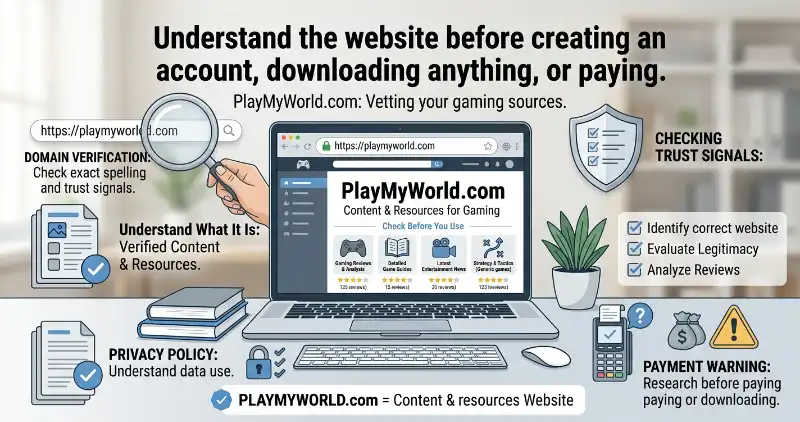
If you found PlayMyWorld through a search result, the first thing to confirm is the exact web address. The domain discussed in this article is playmyworld.com.
That small detail matters because websites can have very similar names. A search result may show a familiar-looking brand name, but the actual destination can be a different domain.
The exact PlayMyWorld domain uses HTTPS, and its own Privacy Policy and Terms & Conditions both identify https://playmyworld.com/ as the website they cover.
How to Confirm You Reached the Right Domain
Look at the address bar before entering any information.
The spelling should be:
playmyworld.com
Pay attention to the ending too. A different extension, extra letter, missing letter, or unusual domain name means you are not on the exact website discussed here.
It is also better to open the domain itself instead of trusting a screenshot, social-media post, or copied description.
If a page claims to represent PlayMyWorld but sends you somewhere else when you click a button, stop and check the destination before continuing.
This is especially important if the page asks for a password, payment, software download, or personal details.
Can You Trust PlayMyWorld.com Enough to Visit or Use?
Finding the correct domain is only one part of the question. You may still be wondering whether the website has enough basic information to make a visit or possible use reasonable.
The current domain has several normal website trust signals.
It has an About page, a Privacy Policy, and Terms & Conditions. Its Privacy Policy explains that the website may collect technical information such as IP addresses, browser information, timestamps, referring pages, and related data. It also discusses cookies and third-party advertising.
PlayMyWorld Terms & Conditions
These pages are useful because they show that the site provides information about its operation and data practices.
But there is an important limit.
Having HTTPS, legal pages, and an About page does not prove that every claim made on a website is accurate. These are basic trust signals, not a guarantee of quality or safety.
What About Third-Party Trust Checks?
A third-party website called Scam Detector currently gives playmyworld.com an automated trust score of 64.5/100 and describes its assessment as “Known. Vetted. Low Risk.”
That assessment also reports signals such as valid HTTPS and no blacklist detection in its check.
However, an automated score should be treated as one outside signal, not as proof that a website is completely safe or unsafe. These systems use their own methods and can change as new information becomes available.
So the useful takeaway is simple:
PlayMyWorld.com has several ordinary website trust signals, but those signals do not independently confirm every service, feature, security claim, or financial offer described on the site.
That distinction becomes more important when you move from simply reading an article to actually giving the website information or money.
What Should You Do Before Creating an Account, Downloading, or Paying?
If you only want to read PlayMyWorld articles, the risk is different from creating an account or making a payment.
Before taking a bigger step, slow down and verify what you are actually being asked to do.
If You Only Want to Read the Website
For normal browsing, start by checking the domain in the address bar.
Read the page you came for and avoid clicking unfamiliar advertisements or download buttons just because they appear inside or around an article.
If another website or pop-up suddenly claims that you need special software to continue, check the source before installing anything.
If You Are Asked to Create an Account
First confirm that the account page is actually on playmyworld.com or an official service clearly connected to it.
Check what information is being requested.
An unfamiliar site asking for an unusually large amount of personal information deserves extra caution. You should also avoid reusing your main email password on another website.
If the site offers a security feature such as two-factor authentication, look for the actual account settings or official instructions rather than relying only on an article that mentions the feature.
If You Are Asked to Download Something
Check what you are downloading and where the download button leads.
A page mentioning gaming does not automatically mean that you need a game client, browser extension, mobile application, or desktop program.
Look for the actual publisher and official download source.
Do not install an unknown file simply because a page says it is required.
If You Are Asked to Pay
This is where extra verification matters most.
Before entering payment information, confirm:
- what you are buying
- the exact price
- whether the payment is one-time or recurring
- the refund terms
- who processes the payment
- whether the payment page belongs to the expected service
- what you receive after paying
Some PlayMyWorld articles make claims about tournaments, rewards, or other paid features. Those claims should be verified directly before you treat them as an available service.
A published article is not enough evidence to send money.
Which PlayMyWorld Claims Are Verified and Which Still Need Proof?
By this point, the main confusion can be reduced to a simple evidence check.
| Information | Current status |
|---|---|
| The exact domain playmyworld.com exists | Verified |
| The website publishes gaming-related content | Verified |
| The site also covers wider entertainment and lifestyle topics | Verified from its About page |
| The domain has Privacy Policy and Terms pages | Verified |
| The site publishes articles describing PlayMyWorld as a gaming platform | Verified as published claims |
| Custom-world or user-created-game features | Needs direct verification |
| Multiplayer or matchmaking features | Needs direct verification |
| Tournaments, rewards, or cash-prize claims | Needs direct verification |
| Specific security features such as 2FA | Needs direct verification |
| A third-party trust score proves the site is safe | No — it is only a third-party assessment |
This table helps separate two things that are easy to mix together.
The first is “Does the website say this?”
The second is “Can I independently confirm that this feature currently works as described?”
Those are not the same question.
For example, if an article says that users can join multiplayer worlds, that tells you the claim was published. It does not by itself prove that the feature is currently available, works in the way described, or is offered under the same conditions today.
That is why claims involving money, downloads, accounts, or personal data deserve a second check.
What Should You Know About PlayMyWorld.com Before You Leave?
The simplest answer is that playmyworld.com is a real, live website with gaming, entertainment, and lifestyle content, but descriptions of it as a specific social gaming platform contain claims that should be checked against the actual service before you rely on them.
The exact domain is important. So is the difference between the site’s own pages and claims made in individual articles.
If you only want to read its content, you can treat it as a website publishing information across several topics.
If you plan to create an account, download software, join a gaming service, or pay for something, take the extra step of confirming the exact feature and destination first.
Honestly, that approach is useful for any unfamiliar website. A familiar name is not enough by itself. The actual domain, the page you are using, the information requested, and the terms attached to an action all matter.
Final Takeaway
Before using PlayMyWorld for anything beyond reading, remember these four points:
- Confirm the exact domain:
playmyworld.com. - Separate website facts from claims published in articles.
- Verify important features directly before relying on them.
- Use extra caution before sharing personal information, downloading files, or making payments.
That gives you a much clearer picture of PlayMyWorld without treating every description online as automatically confirmed.
Frequently Asked Questions
Is PlayMyWorld.com the same as every website using the PlayMyWorld name?
No. The exact domain matters. When checking information about PlayMyWorld, make sure the address is playmyworld.com rather than assuming that every similarly named website is connected to it.
Does PlayMyWorld.com directly provide games or mainly publish gaming content?
The current website clearly publishes gaming-related content and also covers broader entertainment and lifestyle topics. Some articles describe a direct social gaming platform with specific features, but those individual service claims should be verified directly before being treated as confirmed.
Does PlayMyWorld.com require payment to use its services?
The available website content includes claims about paid features and other gaming-related services, but a specific payment requirement should be confirmed on the actual service or payment page before you pay.
Can a third-party PlayMyWorld review prove that the website is trustworthy?
No. A third-party review or automated trust score can provide an additional signal, but it cannot prove that every feature, claim, or transaction on a website is safe or accurate.
What is the safest way to check a PlayMyWorld page?
Start with the address bar and confirm that you are on playmyworld.com. Then check what the page is asking you to do. If it involves an account, download, personal information, or payment, verify the details before continuing.
Feature Image Prompt 1 — Exact Website + Verification
Gemini Prompt:
Create a clean, modern 1200×630 featured image for an authority-style website article titled “PlayMyWorld.com: What Is It and What Should You Know Before Using It?”
Show a realistic desktop browser screen displaying a fictional but clearly readable website address playmyworld.com in the address bar, with a modern gaming and entertainment website visible on the screen. Add subtle visual elements representing website verification: a browser security indicator, a magnifying glass, a small checklist, and a shield icon.
The scene should communicate identifying the correct website, understanding what it is, and checking trust signals before using it.
Use a clean professional editorial style, balanced composition, soft modern lighting, white and dark neutral interface tones with subtle blue accents, no clutter.
Make the text “PlayMyWorld.com” large, sharp, correctly spelled, and fully readable. Add a smaller readable phrase “What Is It?”
No people, no logos from real companies, no fake statistics, no excessive UI elements, no watermark. The image should look like a professional SEO featured image, not an advertisement.
Feature Image Prompt 2 — Gaming Site + Safety Check
Gemini Prompt:
Create a professional 1200×630 editorial featured image for an article about PlayMyWorld.com. Show a laptop displaying a modern gaming and entertainment website, surrounded by subtle visual symbols for online safety and verification: a shield, browser address bar, checkmark, magnifying glass, privacy document, and payment warning symbol.
The main concept should be “Understand the website before creating an account, downloading anything, or paying.”
Clearly display the readable title “PlayMyWorld.com” on the laptop screen and a smaller phrase “Check Before You Use”.
Use a clean authority-blog aesthetic, realistic but slightly polished illustration, strong visual hierarchy, spacious composition, sharp readable typography, no unnecessary decorations.
Avoid depicting PlayMyWorld as a confirmed multiplayer game platform. The image should represent website research, gaming-related content, domain verification, privacy, and user caution. No real brand logos, no watermark, no fake claims, no exaggerated warning imagery.
Image SEO
Image 1
- File name:
playmyworld-com-website-verification.jpg - Alt text:
PlayMyWorld.com website verification and gaming content - Title:
PlayMyWorld.com Website Verification - Caption:
Checking the exact PlayMyWorld.com website before using it. - Description:
A browser showing PlayMyWorld.com with visual cues for website verification, gaming content, and online safety.
Image 2
- File name:
playmyworld-com-safety-check.jpg - Alt text:
PlayMyWorld.com safety and website check before use - Title:
PlayMyWorld.com Safety Check - Caption:
Important checks to make before creating an account, downloading, or paying. - Description:
PlayMyWorld.com represented as a gaming and entertainment website with visual reminders to verify privacy, downloads, accounts, and payments.
Meta Title Options
1. PlayMyWorld.com: What Is It and Is It Safe to Use?
2. PlayMyWorld.com Explained: Website, Safety & Key Checks
Meta Description Options
1. What is PlayMyWorld.com? Learn what the website offers, how to identify the exact domain, and what to check before creating an account or paying.
2. Learn what PlayMyWorld.com is, why its descriptions differ, and what to verify before using the site, downloading anything, or making a payment.

I’m James Carter, a professional writer at Meanexplainer.com, where I write about word meanings, slang, phrases, grammar, and everyday language.
I created my writing approach around one simple idea: understanding a word should be easy, practical, and useful. My articles go beyond basic definitions by explaining how words and phrases are actually used in conversations, texting, social media, and everyday writing.
At Meanexplainer.com I focus on turning confusing language questions into clear, straightforward answers. I regularly cover modern slang, commonly confused words, expressions, grammar, and the changing ways people communicate online.
My goal is to help readers find the right meaning, understand the context, and use words and phrases with confidence.


